


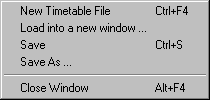
New Timetable - Creates a new instance of the Timetable Editor. The Editor Field of the newly invoked Timetable Editor is blank.
Load into New Window ... - opens a new instance of the Timetable Editor with a specific existing Timetable File which is selected by way of a Windows Open File dialogue.
Save - saves the current state of the Timetable File to the same name it currently possesses.
Save As ... - saves the current state of the Timetable File into a new file with a name of the user's choosing. The file name will be given the extension *.ttt.
Close - closes the Timetable Editor.
Continue: 'Edit' Menu Item